I will admit, when I first took on the task of creating my first professional Twitter, I was a bit skeptical. I couldn’t see how this social media platform could benefit me as a preservice teacher, but can honestly say I was pleasantly surprised with the results.
Disregarding Twitter chats specifically for the moment, I can’t honestly say that Twitter is one of the most beneficial social media platforms for future and current educators. It provides opportunities to communicate with educators across the country from a variety of grade levels, who all have different experiences and opinions to share. The fact that I am able to reach out and communicate with principals, special educator teachers, administrators and experiences teachers just through the use of Twitter honestly amazes me. I felt so honored when my input was met with positive feedback from individuals who’ve spent their lives in the education system, and was excited when I learned new information about a certain curriculum, lesson idea, accommodation, etc. That said, the Twitter chat experience made these connections even better.
To begin, I will admit that I did not participate in as many Twitter chats as I would have liked, but hopefully the end of my busy semester will provide me with more opportunity to do so. I honestly loved participating in the chats that I did. For the sake of this reflection however, I will share two of my most favorite parts of my Twitter chat experience, and explain why I enjoyed these specific tweets so much.
To begin, my first ever Twitter chat provided me with a response that I was very proud of. I participated in the #ntchat, a chat for new new teacher’s, and was very proud of my response to question number 4.
This question focused on ways to support students.
I felt as if my response was very thought provoking, and even helped me figure out ways I can inspire my students. Self-assessment provides students incentive to achieve their own goals, and also builds my students’ sense of autonomy. I was also very proud of the way I articulated my response, as I feel as if I sounded very professional.
Another response that I was proud of was one forms the #tesoloz chat, a chat that deals with ESL students. I responded to a picture of another user’s response to a question regarding translators in the classroom. In this case an argument was being made about whether or not these devices should be allowed for ESL students.
This paragraph is what sparked the discussion in the #tesoloz chat.
I felt as if this response was very important because it is necessary for accommodations to be viewed as devices that allow students to have the same opportunities to succeed as their able peers, not as an advantage. It is also imperative for educators to know how to properly include these devices, such as translators, so that these devices don’t “run” the classroom, but instead assist the students who would not be able to keep up otherwise. Assistive technologies and accommodations ensure that all students have an equal opportunity to learn.
All in all, I am very thankful to experience Twitter at a professional level, and to be able to partake in Twitter chats and communicate and learn from educators around the globe. Although skeptical, I am incredibly happy to have established this professional learning network and would recommend Twitter and Twitter chats for all educators, old and new.
In today’s classrooms, the idea of inclusion is anything but a new concept. Nowadays, children of all backgrounds, cultures and abilities can be found in the general education system. Classrooms are a melting pot, providing a multitude of opportunities for students to learn from one another, and a multitude of challenges for teachers as well. Although each and every individual student’s differences are to be welcomed, there are often instances in which these differences can limit their abilities in the classroom. It is in these cases that certain devices and programs might be required to level the playing field, and ensure that every student is given an equal opportunity to learn. The student should not struggle to adhere to the structure of the class, the class must become accessible to the student. Whether through personal devices or programs implemented by the teacher, accessibility tools are often vital for allowing students to reach their full potential. To extend my knowledge as an aspiring educator, I decided to research three tools that can help make my classroom more accessible for my future students and their potential needs.
I began my search by researching tools that can help my individual students with any and all specific disabilities they may have. Often times, these individual tools can provide my students with a sense of autonomy, and control over their disability so that they may function as well as their able peers. The first tool I discovered is actually a setting provided by Windows 10, Magnifier, in which students with visual impairments can better view their screen and stay on task with the rest of the class during online assignments. This application is preinstalled on most personal Windows 10 computers, and appears as a magnifying glass icon in the settings menu. Once activated, the user may guide the mouse over anything on the screen, magnifying the content to their desired percentage. For visually impaired students and individuals, this application can make staying on task and browsing the web much easier and much less frustrating.
I was able to use the “View” setting to magnify items with my mouse.
I was pleasantly surprised to find that this application was already preinstalled on my own Windows laptop. It was very easy to find and use, and I was able to magnify the entire screen, or just the areas in which I moved my mouse. I also was still able to click and use my computer as normal while simultaneously magnifying my screen. For my future students with visual impairments, this tool can be very easily incorporated into my room in that, it does not need to be installed or purchased beforehand.
When measuring this tool’s effectiveness on the Triple E Evaluation scale, I would easily rate this an 18/18. In no instance do I find this tool as anything but effective and easily used, and it provides my students with the ability to limit their visual impairment on any Windows computer, inside and outside of the classroom. In fact, the only issue that I found with this tool is one that lacks a category on the Triple E rubric. If possible, this tool would lose points for only being compatible on Windows computers. That said, if a school uses only Apple computers, than this specific tool would not be accessible or preloaded on their devices.
The second tool I evaluated was one that is used to assist my students who may have more severe disabilities. Nonverbal students often have plenty of insight to share and want to participate and interact with their verbal peers. In this instance, an augmentative and alternative communication device is required, so that a nonverbal student may be given the gift of communication. These devices come in many forms, and for the sake of this post I have decided to choose one that I found to be most beneficial and accessible for teachers. Proloquo2Go is an AAC device in the form of an application that can be installed and run on an iPad, or similar touchscreen tablet or device. For students with touchscreen cell phones, this application can be installed to provide them with an AAC device that literally fits into their pocket. With a variety of settings, Proloquo2Go can provide students with pictures to select their desired needs, or a keyboard to type sentences that may be translated to speech.
Proloquo2Go is accessible for nearly all ages.
Although weighing in at approximately $250, Proloquo2Go still falls on the cheaper side of the market for AAC devices, and can be installed on whichever device one chooses. More benefits stem from the fact that this device is ultimately an application, meaning that updates may be easily installed as developed, ensuring that students have the access to the newest version of this technology.
When deciding where this device falls on the Triple E Evaluation scale, I believe Proloquo2Go would also receive an 18/18. In my opinion, the gift of communication is priceless, and this specific tool is one of the best of the currently available AAC devices. For my future students, communication barriers may be crossed through the use of Proloquo2Go, and my students will be able to share their thoughts, feelings and insights in ways they never could before. Every student’s voice counts, and Proloquo2Go provides that voice for nonverbal students.
The final tool I discovered was one that could benefit myself in terms of the creation of my own content. In my classroom, I want to ensure that my instruction and the material that I use is always accessible to every one of my students. To accomplish this, I can use a web accessibility tool called WAVE . Quite simply, to utilize this instrument one must copy the link of a website or article into the online tool, and a report of the link’s accessibility is subsequently created.
WAVE is incredibly easy to utilize.
As demonstrated above, WAVE’s website is incredibly simple looking, and very straightforward for teachers who want to ensure that their websites and resources are accessible for all of their students. WAVE will quickly identify any errors, alerts, features, structural elements, or contrast errors that may make the resource difficult for students with a variety of impairments to use. In the future, I feel as if this tool is simple enough for me to use nearly every time I assign or use any type of online resource.
On the Triple E Evaluation rubric, however, WAVE falls a bit lower than the previous two accessibility tools. I ultimately gave this tool a 12/18, as it loses a generous amount of points in the category that focuses on the student’s engagement and how it is advanced by this tool. Being that it is oriented mostly towards educators, and that it merely checks an online resource contrary to changing or enhancing it, I believe that WAVE inadequately seeks to engage students. Besides this, I do believe that this tool can be beneficial in some ways, but not nearly as much as the prior devices listed.
Overall, I believe this search was incredibly helpful and has provided me with an abundance of tools that I can use in my future classroom. From students who are visually impaired, to those who are nonverbal, and everything in between, these accessibility tools can provide all of my students with an equal opportunity to learn. In my case especially, due to the fact that I would prefer to teach special education, I must gather information on as many resources and devices as possible to be used with my students. Education is vital, and every child must have the opportunity to succeed and be the best versions of themselves possible.
Prior to my search, the word TPACK was just a combination of letters that meant nothing to me. I hadn’t the slightest inkling at what it meant besides the assumption that the T stood for technology, as it was a term I first heard in my “Technology in the Curriculum” course. My hypothesis wasn’t very far off. However, I soon discovered that TPACK’s sole purpose isn’t just the use of technology in the classroom, but is how technology must be combined with a generous amount of content and pedagogical knowledge as well. First, I must give credit where credit is due, and therefore would like to attach the video that best described TPACK to a beginner like myself.
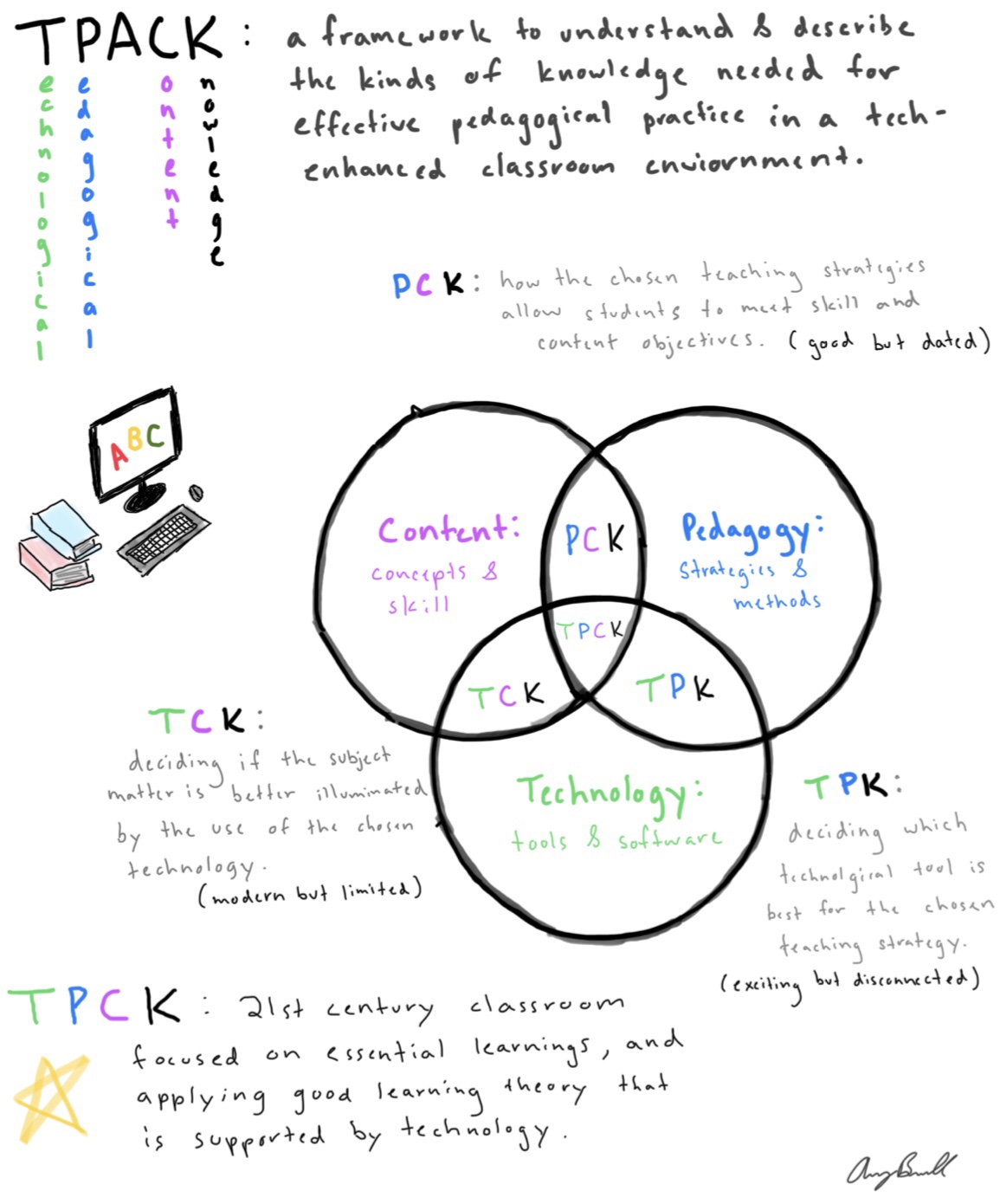
That said, tpack.org defines TPACK as an acronym that stands for technological pedagogical and content knowledge, and is a framework that aims to optimize students’ learning experience and teacher effectiveness in a 21st century classroom. It focuses on a teacher’s ability to know what needs to be taught (content), how it needs to be taught (pedagogy), and which device must be used (technology). To thoroughly understand TPACK, I decided to use the information collected from my sources to create a visual that housed some of my most important findings. This visual was a sketchnote, and was my first experience creating one as well.
My sketchnote is an easy, visual source for information!
I’d like to first note that I loved every moment of creating my sketchnote, and think this is the best method for my note taking in the future, and is also a technique that I can use with my future students. I was able to combine visuals, definitions, diagrams and color coordination in a note page that is easy to follow and can be shared with anyone.
I organized my sketchnote in a strategic manner in order to make it easy to read and understand the TPACK method. I began by color coding the most important terms of the TPACK method, that is technology, pedagogy, and content. I then introduced TPACK and how it is the framework needed for a teacher to correctly integrate technology, effective teaching skills, and overall knowledge of the curriculum to create the most advanced learning environment possible. I subsequently created a Venn diagram of the three main components that was inspired by another one that I found on the Oakland Schools Literacy website. This helped me immensely because it visually depicted how just pedagogical content knowledge, or just technological content knowledge isn’t enough, and how the incorporation of all three is crucial for the 21st century classroom.
In the future, I plan to do my absolute best to adhere to the TPACK framework, as I believe it can provide limitless opportunities for my students. Especially in a special education classroom, technology is vital for helping students achieve, and simply improving their daily life. For example, the incorporation of AAC technology can give a nonverbal student the ability to speak and communicate with others. I must feed off of my students’ abilities, and select the appropriate tech to be used at the appropriate time, whether it be laptops, a SMART board activity, or the use of push button “switches” in a low functioning classroom. This technology, with the incorporation of my pedagogical knowledge, and knowledge of the content can provide my students the best possible environment and opportunities for learning.
After researching more about TPACK and creating my sketchnote, I can definitely say that my knowledge on this framework has grown immensely. I went from being completely unaware of what the acronym stood for, to being able to describe how each element of the framework must be incorporated into the classroom. That being said, I believe this experience has also provided me with a newfound love for sketchnotes and their effectiveness. This method of note taking helps combine visuals and definitions, and allows room for creativity. I believe that sketchnotes will most definitely be incorporated into my future classroom, as it will allow my students the freedom of creating their own little masterpieces while also memorizing and learning the necessary content.
This past week, I created my first professional Twitter account (@averyjbramell), and took part in the RoCo PLN Twitter Challenge in order build onto and create my very own professional learning network. At first, I was a bit hesitant about this challenge, and most of my hesitance stemmed from the fact that I was nervous to interact with other presevice and established teachers on Twitter. I wanted to extend my knowledge to others on Twitter without using any incorrect terminology, or mistaking any pedagogical concepts, as I wanted to be taken seriously and impress the teachers that I interacted with. That said, I took a leap of faith and began the challenge on Monday, completing the first requirement by tweeting about a concept that I had recently learned.
Monday’s Tweets:
As pictured, Dr. Sam Fecich (@SFecich) quickly replied to my tweet and requested more information about the new and novel curriculum I discussed, which gave me the opportunity to extend on the concept. I was very excited about this tweet because I felt as if I gave an impressive amount of information on a concept that another educator was new to, and it made me feel as if the knowledge I passed on could benefit an established educator. The small success from my first tweet gave me a lot of confidence moving forward, as I began to look forward to tweeting and interacting with others in my professional learning network, and that my thoughts and ideas were welcomed and even desired by other educators and preservice teachers.
The second day of the challenge involved the tweeting of a question that I had for any experienced teachers on my professional learning network. I struggled with day two, because I wanted to ask a question that focused on my primary interest of special education, that sounded professional, and that required a decent amount of thought.
Tuesday’s Tweet:
My question was followed by a response from my professor, Amanda Davis (@MandiedavisAD), that very much helped me better understand how important a teacher’s role is in the classroom. If a tone is set that all student’s must respect each other and everyone’s differences, than a student with ASD should not be badgered by his classmates due to his need for additional support.
The third day of the challenge was easily my favorite day, but only until after I completed it. Let me specify. I was initially the most nervous for this task because it required me to join a live twitter chat and communicate with others in real time, asking and answering a multitude of questions in an hour. I decided to join #ntchat, a Twitter chat designed for new teachers. It consisted of five questions between eight and nine o’clock that would be answered and discussed by all of the users involved. A former principal from California, Lisa Dabbs (@teachwithsoul), asked the questions, and the highlight of my chat was when another educator agreed with and supported my response to question three.
Wednesday’s Tweet:
I was super excited when Cassie Reeder (@cassiereederedu) responded to my answer in such a positive manner. After browsing her profile and following her, I could tell that Cassie was an established educator with her own podcast, the “Connected Educator Podcast”, and her opinion was very important to me. I was honored that someone like her had confirmed that my response was meaningful and important, and for that reason, this day of the challenge was my favorite.
Day four involved the tweeting of an article that I found to be important and worthy of sharing to my professional learning network. I decided to search on Education Week for one, because I wanted to ensure that my post would be from a reliable and well known source in the field of education. I also decided to choose an article that involved special education, and subsequently tweeted the most interesting one that I came across.
I enjoyed Thursday’s challenge because it gave me the freedom to choose an article of interest to me, and gave me the opportunity to browse a multitude of interesting articles that dealt with the world of education. That said, it was this challenge that felt the least rewarding, as my article did not generate an immense amount of conversation, and I directly interacted with less individuals than I had the day before.
The final day of the RoCo PLN challenge required a tweet that included five users and accounts that I felt were great resources for other educators on my professional learning network. This tweet was beneficial in that it required me to reflect on my experiences during the challenge to determine which users were my favorite and the most helpful for me.
Overall, this challenge was incredibly fun and beneficial in that it helped me create and establish my professional learning network through Twitter, and set me up with great educators and fellow preservice teachers that I can now share ideas with and continue to learn from. I was also completely unaware of Twitter chats until this challenge and now have the ability to communicate with educators across the country in real time. Ultimately, I am incredibly thankful for the opportunity to participate in this challenge and for all that I have learned from it, and cannot wait to see who I connect with and what more I will learn moving forward.




 Technology in the Curriculum